Study Guide user guide
Quick start
- Begin by selecting either the 'Programmes' or ‘Modules’ tab at the top of the page.
- Use the filters (see 'Glossary' below) on the left to narrow down your search results, or
- If you know what programme or module you're looking for, start to type its name in the search box.
- Click on the correct item if shown, or
- Click the magnifying glass to see the full list of returned results.
- Use the tabs on your preferred programme or module to learn more about it.
| Category | Description |
|---|---|
| Available for modularity | Some programmes leave space for students to take credits outside of their specified programme. Where this is allowed, this filter indicates which modules are available to choose from.
|
| Campus |
|
| Faculty | The University's departments are grouped into three Faculties:
|
| Level of study |
|
|
Module level (= year of study) |
Use this filter to select modules available in a certain year of study.
|
| Stage | A defined segment of study that acts as a checkpoint for progress toward a final award. In a full-time programme, stage 1 = year 1, stage 2 = year 2, etc. |
| Term |
Autumn: October to December
|
Every module has the same page layout. Here are some points to look out for; see Image 1: The structure of module pages for where to find them.
1. Each module has these tabs.
- Module details: the module description and list of topics covered.
- Intended learning outcomes: module-, department-, and person-specific statements outlining the knowledge, skills, and understanding a student is expected to demonstrate upon completing a programme or module.
- Assessment: information about the assessments involved in the module, e.g. the type of activity and it's weighting. ‘Formative’ assessments are in-module activities that help assess learning progress; grades from these assessments do not contribute to your final module mark. Summative assessments assess learning and academic achievement against learning objectives; grades from these assessments do contribute to your final module marks.
- Additional information: could include pre- and co-requisites, any additional module costs, and any other module requirements.
- Accessibility statement: Every module has an accessibility statement. This tab shows if the module meets the baseline standards of accessibility as described in the Accessible Teaching and Learning Policy. Where the module requires exceptions to this policy, these are detailed.
2. Most tabs include ‘Details’ and ‘Teaching and Learning’ boxes which detail core module information, such as the module convenor, which campus it's taught on, how many credits it's worth, which department it sits in, and how it's taught.
3. For information on ‘RQF levels’ and ‘campuses’, see the ‘Glossary for filters’ section above.
4. For explanation of ‘terms’, see the ‘Glossary for filters’ section above.
5. The green ‘ELE’ and ‘Library’ links are for current students. Any student can access full reading lists via the library link. Once registered for a module, students will find teaching resources via their ELE account.
Every programme has the following tabs. (See Image 2 - point 1)
Programme details
- The main body of text explains the programme description and educational aims.
- A ‘Details’ box (Image 2 - point 2) provides core information, such the programme code, which department it sits in, the graduating award, the campus it's delivered on, and how it's taught (e.g. full- or part-time).
- Where relevant, this page will also include a box with any programme-specific regulations or award rules. (Image 2 - point 3).
Programme structure
- The ‘Programme Structure Details’ box (Image 3 - point 5) shows the number of credits students need to take at each stage (see Glossary above for definition) and how this is made up.
- Clicking ‘expand all’ (See: Image 3 - point 6), shows the compulsory and optional modules available at each stage (Image 3 - point 7).
Intended learning outcomes:
A breakdown of the skills and knowledge gained through this programme, and how they are taught and assessessed.
The green ‘ELE’ and ‘Library’ links (Image 2 - point 4) are for current students.
From OMS 2026, Study Guide replaces our previous curriculum publishing facility. If you wish to view programmes or modules from previous years, visit Module and Programme Bank.
Reading lists do not appear in Study Guide. Students can access the Library's Reading List service by searching on module title or code on the Reading Lists page.
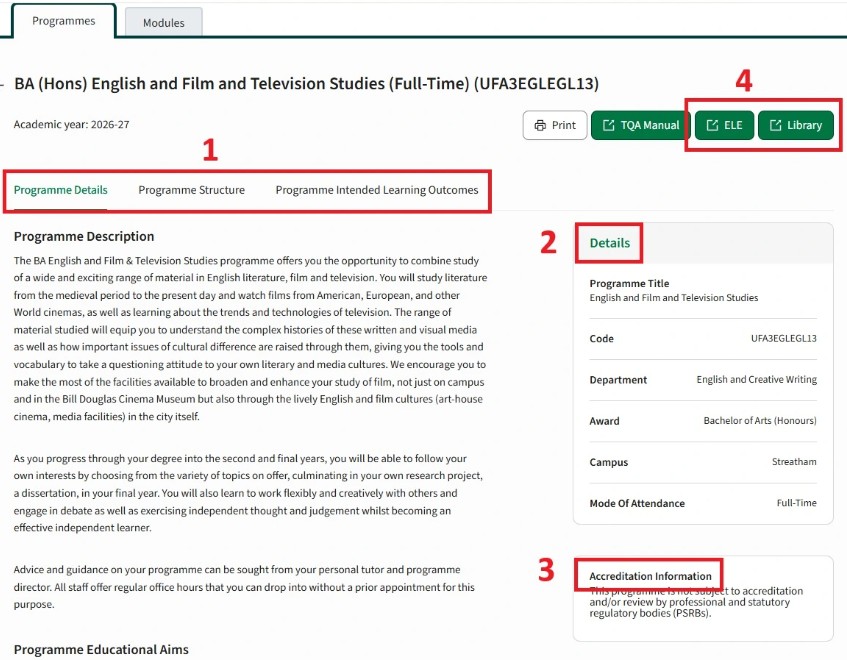
Image 1: The structure of module pages
Image 2: The structure of programme pages
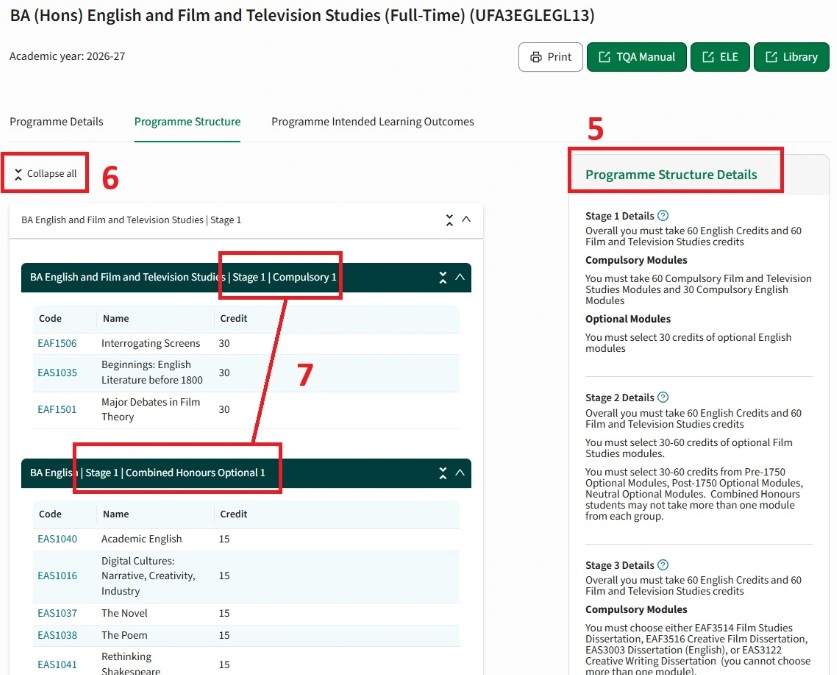
Image 3: Programme structure