Link Sections
Advisory
Reminder: what are link sections?
A link section is a section that is listed, like any other, in the T4 site menu, but instead of containing a webpage it links to another webpage.
That webpage may be within T4, or it can be an external webpage.
You will have covered how to create a link section in the introductory T4 training when you were first given access to T4. If you'd like a reminder, see the training video on link sections (opens in new window).
The link section icon
Instead of a folder icon, link sections have a chain icon (i.e. representing a link).

The advantages of link sections
As link sections enable you to create manual links to webpages in the navigation, they provide the opportunity to choose your own link text without affecting the section names of the pages they link to, or their web addresses.
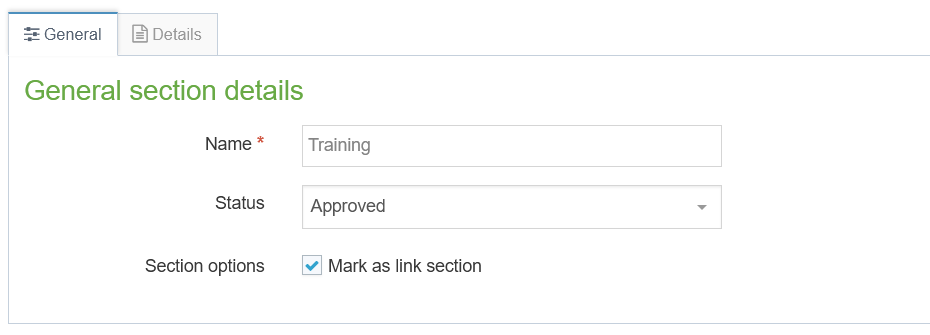
The link section name is set up in the Name field of its General tab, and whatever you use for this will be used as the link text in the navigation:
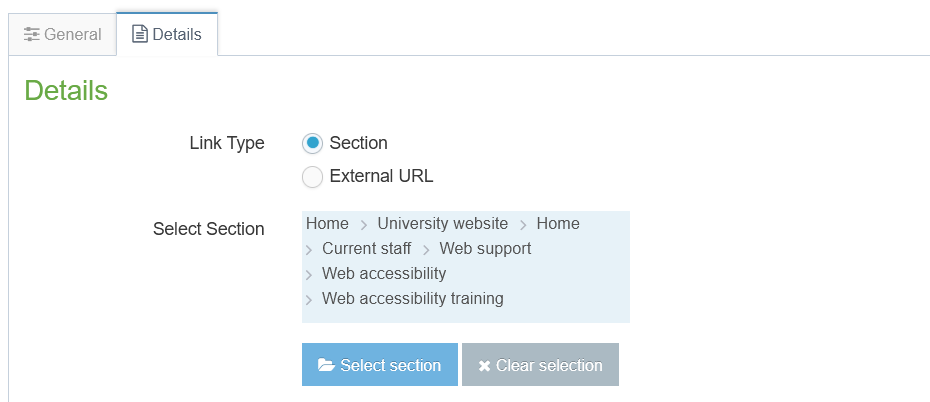
The page that the link section actually links to is set up entirely separately, in its Details tab.
This means that:
- you can create multiple link sections that point to the same page, each with different link text suited to their context, whereas automatically generated navigation links always use the section name of the page.
- if you want to change the text of a particular navigation link later, if it's set up as a link section you can simply edit the contents of its Name field and it will still point to the same page.
- when you create link section(s) to a hidden webpage, this effectively overrides the use of the page's section name as navigation link text. If you do this though, remember that the section name will still appear in its original form in any breadcrumb links to that page.
Example
A page (section) in T4 is called 'Observations'. It has the URL https://www.exeter.ac.uk/polar/weather/observations. Elsewhere, in one of the University sites in T4, a link section is set up that points to that page. The link section is named 'Polar weather observations: spring 2025', so this is the text that appears as a link in the navigation.
Later, the content of the Observations page is updated, but its T4 section name is still simply 'Observations'. The link section is then renamed 'Polar weather observations: summer 2025'.
The result of this change is that:
- The link to the page is unaffected, only the displayed link text in the navigation has changed.
- The URL of the Observations page is unaffected, and remains as
https://www.exeter.ac.uk/polar/weather/observations. - In the breadcrumbs, the link to the page is unaffected, but it always uses the page's section name, 'Observations'.
Further reading
To fully understand navigation links, please read Navigation links: technical terms, followed by the following, in order:
- Navigation links: overview
- Navigation links: visible and hidden sections
- Navigation links: link sections (this page)