Choosing whether to show or hide navigation links to your page
Advisory
Show automatically generated links in the navigation
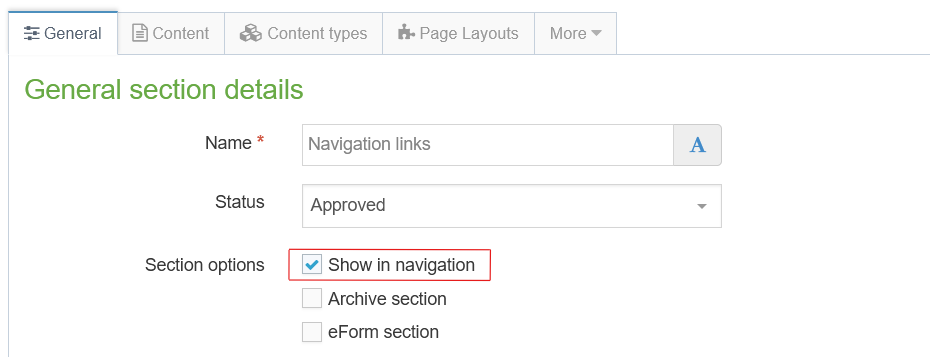
In the 'General' tab of your webpage, under 'General section details' and next to 'Section options', you'll find a box labelled 'Show in navigation'. If that box is ticked, navigation links using the section name will be generated automatically by T4.
Sections with automatically generated links in the navigation have a shaded folder icon in T4. They are generally referred to as 'visible' sections.

Hidden webpages
If the 'Show in navigation' box is not ticked, then the page will still be published (if its status is approved, and it has content), but no links will be automatically generated in the navigation menus.
Sections that do not have automatically generated links have an unshaded folder icon in T4.

Hidden pages and breadcrumbs
Even though a hidden webpage does not appear in the navigation, you will still need to consider its section name for navigational purposes if it has any subpages. This is because a subpage will have breadcrumbs that will automatically include a link up to the hidden parent page, and that link will use the section name of that parent.
Important: hidden pages, search engines and page visibility
Remember that in T4 a 'section' is the term used for a webpage, so the two terms are used interchangeably.
As we've seen, sections that are not visible in T4's navigation are generally referred to as 'hidden' sections, but it's important to remember here that 'hidden' only refers to the section's status in the navigation – it doesn't apply to the page's visibility to search engines.
Any webpage published on one of our T4 websites cannot be guaranteed to be, or to remain, hidden from readers or search engines unless you have arranged this with the web team for that specific content.
Unindexed pages
Pages that are not listed by search engines are referred to as unindexed pages, so the key point to remember is that 'hidden' does not necessarily mean 'unindexed'.
With older methods of webbing on our T4 sites, if a webpage did not have a link to it then a search engine would not be able to find it – this is no longer the case.
In certain circumstances, we can hide a webpage from search engines through various techniques. If you believe that your webpage needs to be unindexed, or you have any questions, please email the web team for advice. For new webpages, please enquire before creating the page in question.
Restricted content
Also consider whether your webpage will contain content which should have restricted access (password protection). If this is the case, then unless you are already familiar with editing in a secure web space within T4, you must contact the web team before creating the content, so that you can be advised on the most appropriate course of action. In certain circumstances, T4 may not be the best environment for your content, but where this is the case, alternative options will be provided.
Further reading
To fully understand navigation links, please read Navigation links: technical terms, followed by the following, in order:
- Navigation links: overview
- Navigation links: visible and hidden sections (this page)
- Navigation links: link sections